
How to Improve Email Deliverability in 2026 (SPF, DKIM, DMARC & the New Sender Rules)
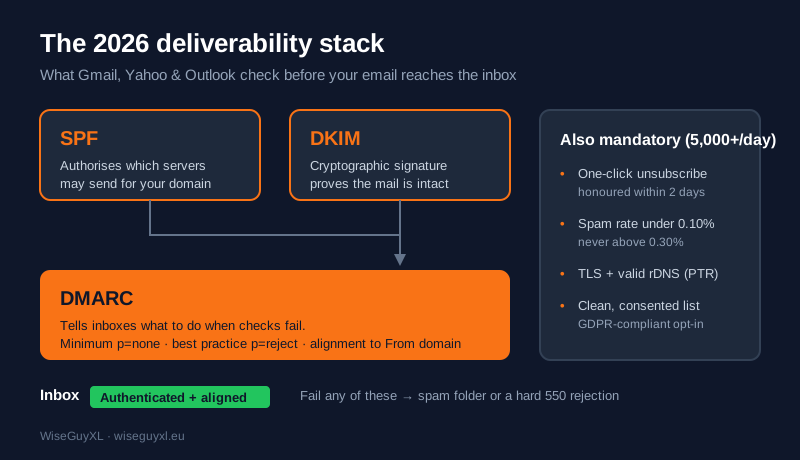
Quick answer: To land in the inbox in 2026, authenticate every message with SPF and DKIM, publish a DMARC record (start at p=none, move to p=reject), and make sure at least one of SPF or DKIM aligns with your visible “From” domain. If you send 5,000+ emails a day to Gmail, Yahoo or Outlook addresses, you must also offer one-click unsubscribe (honoured within two days), keep your spam-complaint rate under 0.10% (never above 0.30%), send over TLS, and mail only people who genuinely opted in. Miss these and your mail is deferred, filtered to spam, or rejected outright with a 550 error.
Deliverability is no longer a “nice to have” that email teams tune once a year. Since Google and Yahoo introduced their bulk-sender requirements — and Microsoft followed for Outlook.com — authentication is a hard gate. Google escalated from temporary 421 deferrals to permanent 550 rejections for non-compliant bulk mail in late 2025, and by 2026 all three major inbox providers enforce the rules strictly. This guide walks a European marketing team through what actually moves the needle.
What “deliverability” really means
Deliverability is the share of the emails you send that actually reach the inbox — not just the ones that don’t bounce. A message can be delivered (accepted by the receiving server) yet never seen because it was routed to spam. The receiving provider decides placement in milliseconds using three broad signals: identity (can it prove who you are?), reputation (do people who get your mail want it?), and infrastructure (are you sending like a legitimate, secure sender?). Authentication answers the first, engagement answers the second, and technical hygiene answers the third.
“No matter who their email provider is, all users deserve the safest, most secure experience possible. In the interconnected world of email, that takes all of us working together.” — Marcel Becker, Sr. Dir. Product at Yahoo, on the joint Google–Yahoo sender requirements.
That “working together” is the point: the requirements are now an industry standard, not one mailbox provider’s preference. Meet them once and you satisfy Gmail, Yahoo and Outlook at the same time.
Step 1 — Authenticate with SPF, DKIM and DMARC
SPF (Sender Policy Framework) is a DNS record listing the servers allowed to send mail for your domain. If your emails leave through your ESP (Klaviyo, Brevo, Mailchimp, HubSpot, an in-house server), that sending source must be included in your SPF record. Keep it to a single record and stay under the 10-DNS-lookup limit, or SPF silently breaks.
DKIM (DomainKeys Identified Mail) adds a cryptographic signature to every message. The receiver fetches your public key from DNS and confirms the mail wasn’t tampered with in transit and really came from your domain. Use a 2048-bit key where your provider supports it.
DMARC (Domain-based Message Authentication, Reporting & Conformance) ties the two together and tells inboxes what to do when a check fails. The minimum required record is p=none (monitor only); best practice is to progress to p=reject once your reports are clean. A simple starting record:
v=DMARC1; p=none; rua=mailto:dmarc@yourdomain.eu; fo=1
The rua address collects aggregate reports so you can see who is sending as you before you tighten the policy.
Alignment is the part teams miss. Passing SPF or DKIM is not enough on its own — at least one must align with the domain your recipients see in the “From” field. If you send from news@yourdomain.eu, authentication that only validates your ESP’s domain will pass the check but fail alignment, and DMARC will treat the mail as unauthenticated. Send from a subdomain you control (for example mail.yourdomain.eu) and configure your ESP to sign with it.
Step 2 — Meet the bulk-sender rules
If you send 5,000 or more messages a day to Gmail, Yahoo or Outlook.com recipients, treat these as mandatory:
| Requirement | What it means in practice |
|---|---|
| SPF + DKIM + alignment | Both must pass; at least one aligned to the From domain |
| DMARC published | p=none minimum, p=reject recommended |
| One-click unsubscribe | A working List-Unsubscribe header; requests honoured within 2 days |
| Spam complaints < 0.10% | Measured in Google Postmaster Tools; never let it reach 0.30% |
| TLS in transit | Encrypted connection required |
| Valid reverse DNS (PTR) | Your sending IP must resolve back to a hostname (FCrDNS) |
| Honest headers | No spoofed or misleading “From” names |
The 5,000/day figure is a rolling threshold, not a monthly average, and it counts per provider. Cross it once and you are a “bulk sender” in their eyes. Most European e-commerce and B2B lists cross it during campaigns even if daily transactional volume is lower, so build for the rule rather than hoping to stay under it.
Step 3 — Protect your reputation before you scale
Authentication gets you to the door; reputation decides whether you’re let in. The single biggest lever is the spam-complaint rate. At 0.10% you have roughly one complaint per thousand delivered emails; at 0.30% providers start throttling or blocking you. Watch it in Google Postmaster Tools and Yahoo’s Complaint Feedback Loop, and act on any upward trend the same week.
What drives complaints down: mailing only people who clearly asked to hear from you, making the unsubscribe link obvious (people who can’t find it hit “report spam” instead), and cutting frequency when engagement dips. List hygiene matters just as much — remove hard bounces immediately, suppress addresses that haven’t opened in 6–12 months, and never buy or rent lists. Purchased lists are riddled with spam traps that torch your reputation in a single send, and in the EU they are almost always unlawful to mail (see the legal note below).
Warm up new domains and IPs. A brand-new sending domain has no reputation, so ramp volume gradually over 2–4 weeks, starting with your most engaged contacts, before pushing full campaign volume.
Step 4 — The European legal layer (it affects deliverability too)
Deliverability and consent are linked: an unconsented list generates complaints, and complaints wreck placement. Under the GDPR and the ePrivacy rules, marketing email to consumers in the EU generally requires prior opt-in consent, and several markets are stricter still. Germany requires verifiable double opt-in and, under § 7 UWG, is strict even on B2B cold email (with real Abmahnung — cease-and-desist — risk). France (CNIL) requires opt-in for B2C and has banned dark patterns in consent flows. Spain (LOPDGDD/LSSI-CE), Italy (Garante) and Poland (RODO/PKE) are consent-first. The Netherlands and the UK (PECR) allow a narrower “soft opt-in” for existing customers of similar products. The practical takeaway: a clean, consented list is not only the law — it is your best deliverability asset, because it is the list least likely to complain.
A 20-minute deliverability audit
Run this checklist today: (1) send a test to a Gmail and a Yahoo address and view “Show original” to confirm SPF, DKIM and DMARC all read PASS; (2) check your DMARC policy in DNS and confirm reports are arriving; (3) open Google Postmaster Tools and read your domain reputation and spam rate; (4) click your own unsubscribe link and confirm it works in one step; (5) scan the last 90 days for addresses that never open and suppress them. Most inbox problems trace back to one of these five.
Frequently asked questions
Why are my emails going to spam even though nothing changed?
Usually reputation, not content. A spike in complaints, a stale segment you re-activated, or a DKIM key that expired can all move you to spam. Check Postmaster Tools first.
Do I need DMARC if I’m a small sender?
You aren’t required to until you hit bulk volume, but publishing at least p=none protects your domain from spoofing and gives you visibility. There’s no downside.
Is p=reject risky?
Only if you skip the monitoring phase. Run p=none, read the reports until every legitimate source passes, then move to p=quarantine and finally p=reject.
Does buying a list ever make sense?
No. It fails EU consent law in almost every case, and technically it’s the fastest way to hit spam traps and destroy sender reputation.
How long does it take to fix bad deliverability?
Authentication fixes take effect within a day or two of DNS propagation. Rebuilding a damaged reputation takes weeks of clean, engaged sending.
Sources
- Red Sift — 2026 bulk email sender requirements checklist: Microsoft, Google, and Yahoo compliance guide — https://redsift.com/guides/bulk-email-sender-requirements
- Google — Gmail introduces new requirements to fight spam (Neil Kumaran / Marcel Becker quote) — https://blog.google/products/gmail/gmail-security-authentication-spam-protection/
- PowerDMARC — Google and Yahoo Email Authentication Requirements 2026 — https://powerdmarc.com/google-and-yahoo-email-authentication-requirements/
- EasyDMARC — Email Deliverability Issues in 2026: 9 Common Problems and Fixes — https://easydmarc.com/blog/email-deliverability-issues-in-2026/
CTA
Landing in spam instead of the inbox? WiseGuyXL sets up SPF, DKIM and DMARC, cleans your list and rebuilds sender reputation across European markets — the same discipline behind 341% organic growth across 30+ projects in 9+ markets. Talk to us about your deliverability →
Internal links: GDPR-compliant email marketing · Email marketing cost · Insights blog